Your guests find their photos in seconds. Not hours.
Xtasveer matches every guest to their own photos in seconds with on-device AI face recognition, hands gallery admin to your clients, and runs your quotes and payments in the same place. You shoot. It delivers.
Set it up once. It runs every event after that.
From a card full of RAWs to a guest holding their own photos, without a spreadsheet in between.
Xtasveer is face recognition photo sharing for event photographers: guests take one selfie and instantly get every photo of themselves from the event.
Upload and hand off
Bulk-ingest a shoot from the desktop uploader. Assign your client as a Co-Host and let them own folder structure and privacy.
Guests join by QR or link
Share one QR code at the event or a single link afterwards. No guest lists to build, no invitations to chase.
AI does the matching
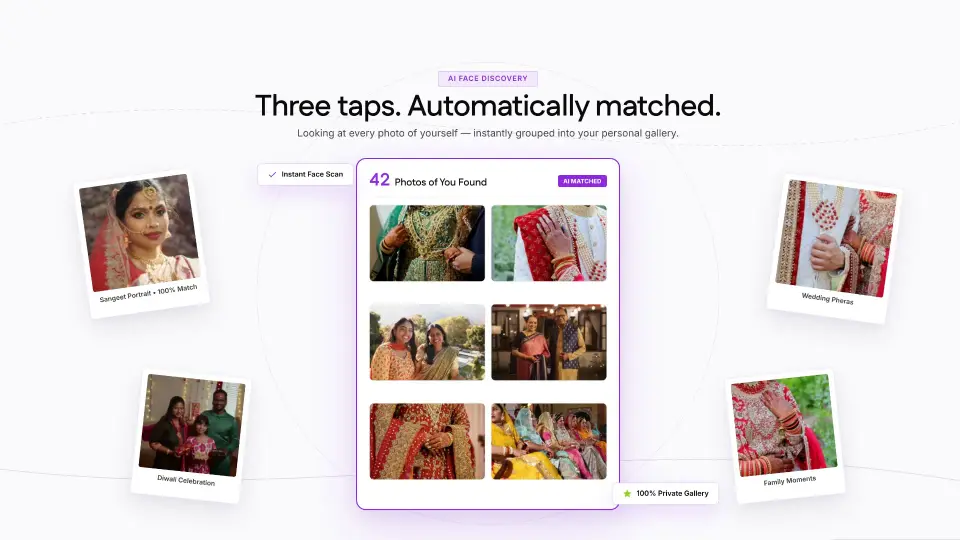
A guest adds one selfie and instantly gets every photo they appear in — including photos of the family members they have labelled.
Three taps and they have their photos.
No app to install, no folder to scroll, no asking you to find them.
Join the event
Scan the QR code at the venue or open the link your photographer sent. No app to install.
Add one selfie
That selfie is only used to match your face inside this event. You can label extra selfies for family and pull their photos in too.
Your photos appear
Every shot you are in, ready to view and download — and you are told when new ones land.
Replaces the gallery host, the quote doc, and the payment tracker.
Everything a studio does between the shoot and the final invoice, in a single workspace.
Face matching, per event
Recognition runs against one event only. Nothing is pooled across clients, and no model is trained on your guests.
Co-Hosts and team roles
Hand a gallery to your client, and give each staff member only the permissions they need.
Quotes, payments and clients
Build quotes from reusable items, record what each client owes, and keep their history beside the gallery.
Favourites
Hosts and Co-Hosts star the picks into one shared list, so album selections arrive as a list rather than a thread of filenames.
Compression you choose
Pick how much smaller stored files should be, per batch, and watch usage against your plan as you go.
Match notifications
Guests are told the moment new photos of them land, so galleries keep pulling people back.
Photos and video, straight off the card
Ingest whole shoots without converting anything first. iPhone HEIC files are handled for you, and video sits in the same gallery as the stills.
- Photos
- JPEG · PNG · WebP · HEIC
- Video
- MP4 · MOV · M4V · AVI · MKV · WebM
The part your clients will ask about
- Matching stays inside one eventA scan never reaches another client’s wedding.
- No model is trained on your guestsFaces are matched, not harvested for training.
- Guests can delete a scanTheir selfies and face data go with it.
- Two folder states, no guessworkPublic to everyone in the event, or private to you and your Co-Hosts.
Delivery is the easy half. The rest is where the hours go.
Most galleries stop once the photos are online. The admin around them is what actually eats a studio’s week.
Which plan do I need?
400 GB
4 events live · stored as 40 GB
Plus₹4,499/year
Holds 500 GB of photos
50 GB quota
Plus
₹4,499
Flexible
~₹2,000
Flexible costs less for you
Compare every plan side by side
Free forever to start, no card needed. Paid plans from ₹375/month billed yearly, or Flexible at ₹10 per GB.
The things studios ask before they switch
How does the face matching actually work?
Your uploader detects faces as the shoot is ingested and stores a mathematical descriptor for each one — not a copy of the face. When a guest adds a selfie, we compare it against the descriptors from that event only, and show them what matches.
What happens to a guest’s selfie?
It is kept against their own account so their gallery keeps working as you upload more, and it is used for nothing else. A guest can delete a face scan and its selfies at any time, and a studio admin can delete a guest’s data outright.
Can a guest find photos of their family too?
Yes. A guest can label extra selfies — "Mum", "Dad", "Me" — and pull every relative’s photos into the same account, without separate logins for each person.
Do my clients need to install anything?
No. Guests join by QR code or link in a browser. Your studio also runs entirely in the browser; the desktop uploader is optional and exists because bulk ingest is faster from your own machine.
What can I upload?
Photos as JPEG, PNG, WebP or HEIC — iPhone files are converted for you — and video as MP4, MOV, M4V, AVI, MKV or WebM. Video sits in the same gallery as the stills.
Who can see which folders?
Every folder is either public or restricted. Public folders are open to everyone in the event; restricted folders are visible only to you and your Co-Hosts, and guests never see that they exist. Promote a client to Co-Host and they can set that themselves.
How is it priced?
Plans are sized by storage, with a free tier to start on. Pay yearly and every paid plan works out about 15% cheaper. Uploads pause when a plan is full, so nothing is delivered that you have not paid for.
Can my team have their own logins?
Yes, with permissions toggled feature by feature — events, folders, photos, favourites, clients, quotes, payments, team and settings are each granted separately, so a second shooter sees only what they need.
Still have a question?
Ask it on a 30-minute call — we will walk you through every feature, live.